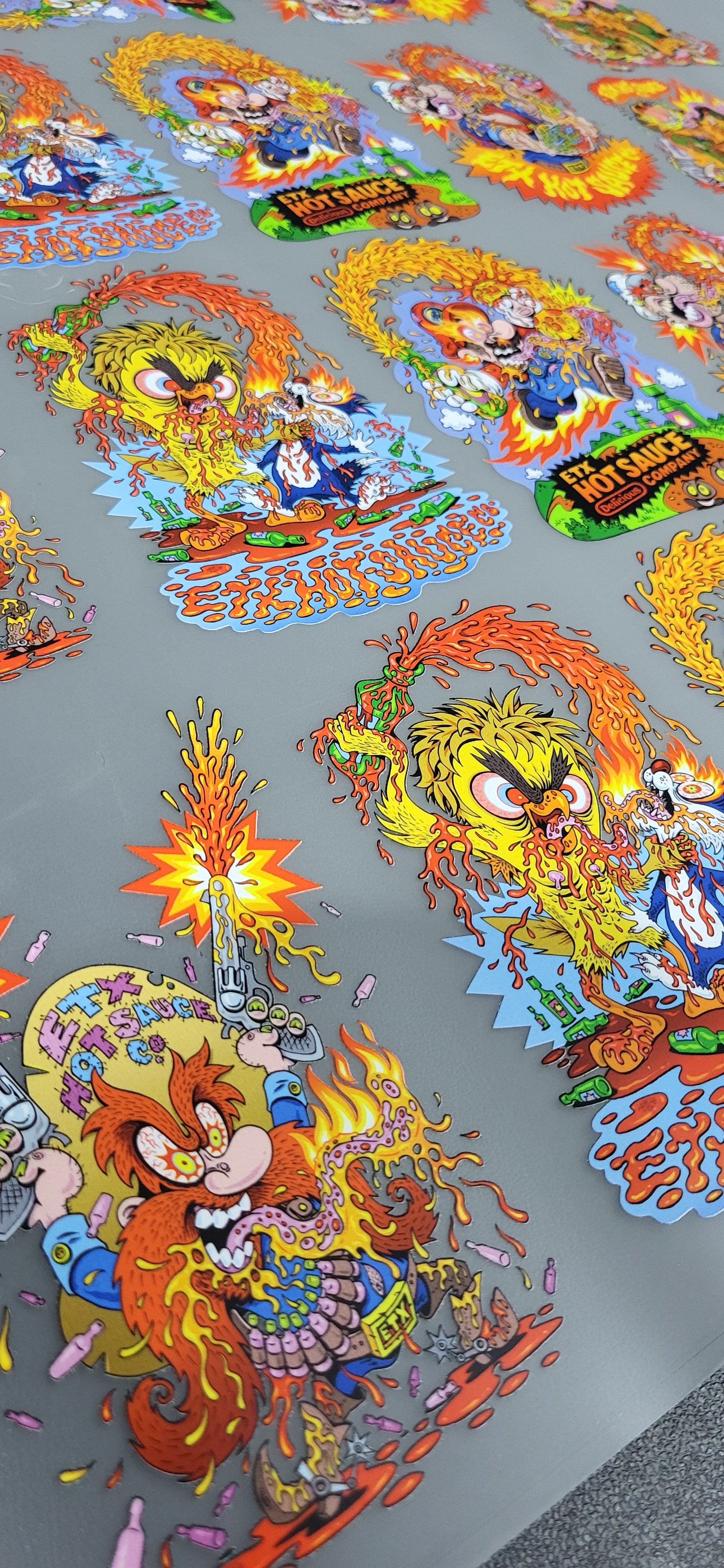
AI DTF Gang Sheet Builder

AI DTF Gang Sheet Builder

Regular price $6.00
Unit price per
Size

Create Custom Apparel with AI-Powered DTF Gang Sheets
Transform your designs into vibrant, high-quality prints with our AI DTF Gang Sheet Builder. Now featuring intelligent design assistance, our platform makes it easier than ever to create professional gang sheets. Perfect for small businesses, designers, and apparel creators, our gang sheets deliver superior durability, vibrant colors, and effortless application.

AI-Enhanced Design Process

  • Smart Design Assistance: Let AI help optimize your layouts and designs for maximum impact.
  • Automated Gang Sheet Creation: Combine multiple designs onto one sheet with intelligent spacing and arrangement.
  • Instant Preview: See your final print before ordering with AI-powered visualization.

Premium Quality You Can Trust

  • Durable Prints: Transfers withstand repeated washing without fading or cracking.
  • Versatile Application: Compatible with cotton, polyester, blends, and more.

How It Works

  1. Upload Your Designs: Let AI analyze and optimize your artwork automatically.
  2. Build Your Gang Sheet: Use our intelligent builder to arrange multiple designs efficiently.
  3. Heat Press Application: Apply the transfer in minutes with any standard heat press.

Why Choose AI DTF Gang Sheets?
Unlike traditional methods, our AI-powered solution offers:

  • Full-Color Range: Reproduce complex designs with precision.
  • No Weeding Required: Save time and focus on creativity.
  • Lower Costs: Minimize waste and maximize value with intelligent layout optimization.
  • Faster Workflow: AI assistance reduces design time significantly.

Order Your AI-Powered DTF Gang Sheets Today
Ready to revolutionize your custom apparel production? Our AI DTF Gang Sheet Builder combines cutting-edge technology with professional-quality results. Experience faster design, better layouts, and exceptional prints with Red Flowerz.

  • DTF gang sheet is a type of printing sheet used in Direct-to-Film (DTF) printing, a modern and versatile garment printing technique. A gang sheet is specifically designed to maximize efficiency by combining multiple designs onto a single sheet, allowing you to print all the designs at once. This makes it an excellent choice for businesses and individuals looking to save time and reduce costs.

    Key Features of a DTF Gang Sheet

    1. Multiple Designs on One Sheet: You can "gang" or arrange multiple logos, images, or designs onto a single sheet, ensuring no space is wasted.
    2. Customizable Sizes: Common sizes include 22x12", 22x24", 22x36", and larger options, catering to your specific needs.
    3. High-Quality Prints: DTF printing provides vibrant colors, fine details, and durable transfers that are resistant to cracking or fading.
    4. Flexible Applications: Works on a variety of fabrics, including cotton, polyester, and blends.

    Who Uses DTF Gang Sheets?

    • Apparel Designers: Ideal for creating custom T-shirts, hoodies, and tote bags.
    • Small Businesses: Perfect for bulk printing of logos or branded merchandise.
    • DIY Enthusiasts: Great for creating personalized gifts or small-batch clothing lines.

    How to Use a DTF Gang Sheet

    1. Design Your Layout: Arrange multiple designs onto a single sheet using design software.
    2. Print with DTF Technology: The designs are printed onto a film, powdered with adhesive, and cured.
    3. Transfer with a Heat Press: The designs are applied directly to the garment using heat and pressure.

    Why Choose DTF Gang Sheets?

    • Cost-Effective: Reduce waste and save money by printing multiple designs at once.
    • Time-Saving: Streamlines the production process, especially for bulk orders.
    • Versatile: Works on light or dark fabrics and various garment types.

    Whether you're running a small business or creating custom apparel at home, DTF gang sheets are a game-changer in garment printing.

  • What Makes Our Colors Stand Out?

    1. Vivid Brightness: Our expanded color palette ensures your designs pop with life-like vibrancy.
    2. Exceptional Accuracy: With 9 colors working together, even the smallest details and gradients are reproduced flawlessly.
    3. Expanded Color Range: From soft pastels to bold neons, we cover it all!

    Why Does This Matter for Your Custom Prints?

    • Maximized Customization: Perfect for intricate, multi-color designs and gradients.
    • True-to-Life Results: Your artwork will appear exactly as you envisioned it—no compromises.
    • Durable Brilliance: Colors stay vibrant wash after wash without fading.

    🎨 Perfect for:

    • Detailed logos
    • Full-color artwork
    • Complex designs with gradients and shading

    Order your DTF gang sheets today and see the difference our 9-color system makes! 🌈✨

  • File Size: Ensure your file isn’t compressed to avoid quality loss.

    Color Enhancements: If your designs include gradients, shadows, or intricate details, confirm they translate well in the CMYK+RGBO printing process.

    Design Software: Use tools like Adobe Photoshop, Illustrator, or CorelDRAW for professional results.

  • Preparing your designs properly is key to ensuring high-quality, vibrant results. Follow this detailed guide to make sure your artwork is print-ready:

    1. Use the Correct File Format

    • Preferred Formats: Save your design in high-quality formats such as PNGTIFF, or PSD. These formats support transparency and retain image quality.
    • Vector Formats: Use AIEPS, or PDF for scalable graphics that remain sharp at any size.

    2. Set the Right Resolution

    • Recommended Resolution: 300 DPI (dots per inch) to maintain crisp and detailed prints.
    • Why: Lower resolutions can result in blurry or pixelated prints.

    3. Work in CMYK Color Mode

    • Why CMYK?: It’s the standard color profile for printing and ensures accurate color reproduction.
    • Tip: If you’re designing in RGB, convert the file to CMYK before submission to prevent unexpected color changes.

    4. Organize Your Designs for a Gang Sheet

    • Combine Multiple Designs: Arrange your artwork on a single sheet (e.g., 22x24") to optimize space and reduce costs.
    • Spacing: Leave a small gap between designs for easy cutting and application.

    5. Use Transparent Backgrounds

    • Remove any unnecessary backgrounds in your artwork to ensure only the intended design is printed.
    • Tip: Save files with transparent backgrounds (e.g., PNG) for the best results.

    6. Scale Your Design Correctly

    • Resize your artwork to the exact dimensions you need on the garment.
    • Tip: Use real-world measurements to ensure your design will fit perfectly on the intended product.

    7. Outline Text and Expand Strokes

    • Outline Text: Convert text to paths (or curves) to prevent font compatibility issues.
    • Expand Strokes: Make sure any lines or strokes are thick enough (at least 1mm) to print clearly.

    8. Mirror Your Design (If Required)

    • Why Mirror?: DTF prints are transferred face-down, so text or directional elements must be flipped horizontally.

    9. Save and Flatten Layers

    • Flatten your design into a single layer to avoid accidental shifts or hidden elements during the printing process.

    10. Review and Test

    • Check for Errors: Zoom in to inspect details, colors, and alignment.
    • Test Print: If possible, print a small test design to ensure everything looks as expected.